

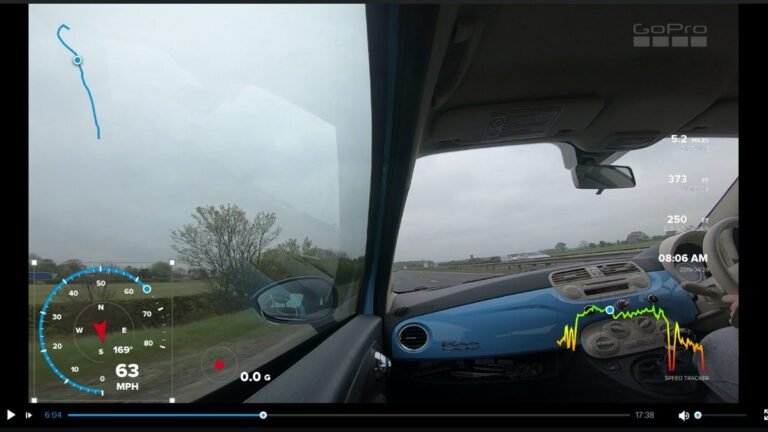
Hello to everyone using GoPro. How have you guys been? Hope everybody is doing great. I thought of writing this article to show you, folks, how to add GPS overlays to your GoPro videos. I will do a write-up and also will embed a YouTube video tutorial for you lovely people out there. Adding GoPro GPS overlays are simple.
You can easily add GoPro speed overlay, GoPro distance overlays, GoPro elevation overlays, and many other stickers to your videos in a matter of seconds. How to add GoPro GPS stickers to GoPro videos? If you ask this question to folks using GoPro action cameras, 8 out of 10 people would know nothing about it. Even though it is as simple as riding a cycle. Check out more GoPro articles.
Let me get right into it. PS: These stickers can be added in GoPro 5 and above. I have GoPro 5 and GoPro 7, in both the cameras these can be added. I love adding GoPro speed overlay and GoPro elevation overlay to my videos. They look cool!
What are GoPro GPS stickers or overlays?
I am a huge fan of red bull videos. Especially cycling videos, coz I am fond of cycling myself. In a lot of cycling videos, you might have seen the speed and distance stickers. GoPro elevation overlay, speed overlay, distance overlay are something that you can get on the videos by turning on your GPS in your GoPro. These speeds, distance, elevation, etc. stickers look cool.
GoPro offers a lot of other stickers and not just speed and distance. If you edit a video in their application known as Quik, you will get to see a lot of other GPS telemetry data as well. This data can be on your videos and make them look very professional. Look at the screenshot of the Quik GPS data overlays offered by GoPro.
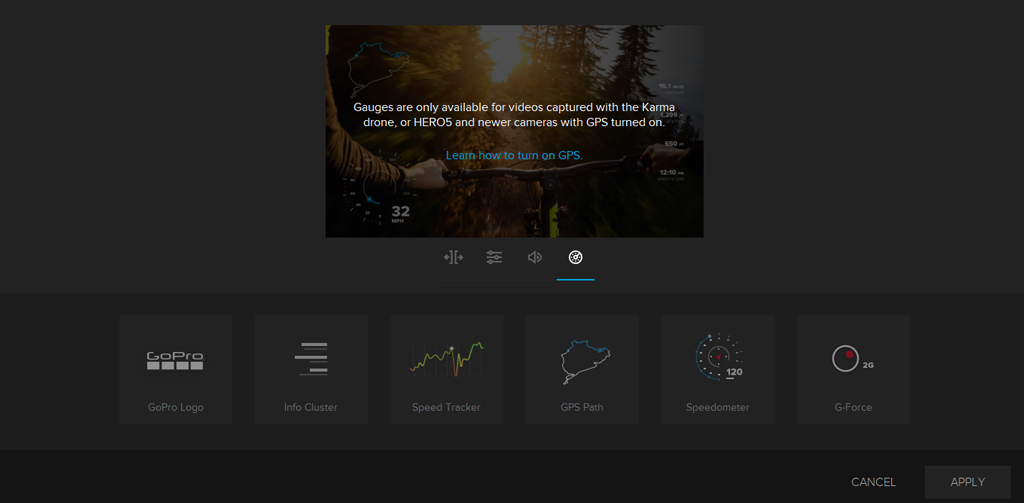
If you look at the image above, there are many overlays and not just speed distance and elevation. Let me give you a brief about all of them.
GoPro GPS Overlay Stickers Types
GoPro Logo
it is quite simple. When you choose the first block option the logo of GoPro comes on your video. A lot of people like this logo being there, however, I do not. It just takes away a place that I could use for other important stickers.
Info Cluster
The info cluster option includes GoPro stickers like distance, altitude, elevation gain, and time. You will get all this information on the video when you click on it. In simple words, you get information about four data points. in Info Cluster.
- Distance (KM and Miles)
- Altitude
- Elevation Gain
- Date & Time
Speed Tracker
Speed tracker unlike speedometer does not tell you about the current speed at which your GoPro camera is changing it’s location but tells you the rise and drop of speed in a graphical form. I do not like this as such but good feature to have for those who like.
GPS Path
GPS path is a simple map that tells you about your current location on the route that you are. For e.g. if I am cycling around the city it tells me the exact location of my GoPro camera on the map.
Speedometer
A speedometer just a speed gauge that gets superimposed on your video and tells you the speed of the activity that you are doing. Very helpful in high-speed activities like cycling biking car racing etc.
G-Force
This sticker gives you the measure of how much g-force you are pulling as you accelerate or change your direction. For folks who are confused about the G-Force, A g-force is a measure of acceleration. 1G is the acceleration we feel due to the force of gravity. It’s what keeps our feet firmly planted on the ground. Gravity is measured in meters per second squared or m/s2.
How to add GoPro GPS stickers to your GoPro footage?
You can add these GoPro GPS overlays with the help of the GoPro App on your mobile phone, or with the help of GoPro Quik on your laptop or desktop. Let us discuss both ways, I also have some screenshots to explain you better.
Adding from your Mobile phone by GoPro App
It is very simple. All you need to do is import the video from your GoPro to your mobile app. Post importing the clip from your GoPro you need to edit the clip in the mobile application. Once you start editing the clip you will see a menu on the footer area like below.
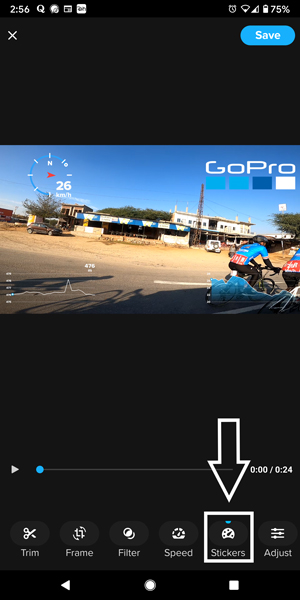
You see this sticker option, just tap on it and you will see the submenu under this “Stickers” item. Below is what you will see on your mobile screen.

Once you have the sub menu opened on your mobile phone you can choose any of the stickers you see and get that sticker imposed on your GoPro footage. Below is the next step where you just need to save the video footage with stickers on your phone.

There you go. Your GoPro video is ready with your GoPro GPS stickers ready to be shared to any platform available. Speaking about sharing, please share this article.
Adding from your desktop/Laptop GoPro App
The process is quite simple. The steps are the same when you are doing it on your desktop. Just a different interface to look at and work on. So instead of a detailed explanation let me give you the points which are easy to remember.
- First, you need to connect your GoPro to your PC and download all the video files from your camera
- Click the video you need to have these overlays on and click on “open in create mode”
- Once you open the file in create mode and click on adjust gauges which is on the extreme right below the video
- If will show up all the GPS telemetry overlay stickers, select the one you want on your video
- You can drag the sticker manually or change the size as per your needs
- After you are done click on save and the GoPro app will save a new video for you with the overlays which you selected
That’s it folks. You video with GPS overlays is ready to be shared.
So this was all about the GoPro GPS stickers folks. So whether it is GoPro elevation overlay or GoPro speed overlay get these on your videos and make them look cool in front of your friends. Share this article spread knowledge. Any questions still? Be sure to drop in the comments, I will answer them ASAP.
Hi,
Thanks for these insights.
Can you add more info for the section: “ADDING FROM YOUR DESKTOP/LAPTOP GOPRO APP”?
In particular what OS do you use?
And what software do you use to “open in create mode”.
Cheers
Hello Matt,
I primarily use a PC (Windows) as OS and I use GoPro Quik as a preferred software for adding these GPS overlays. GoPro Quik is easy and an amazing software by GoPro for these tasks and it works like a charm.
Let me know if you have any other questions.
Thanks
Varun